TYPO3 MCP + AI Suite
AI Suite MCP is a standalone TYPO3 extension that provides an MCP server (Model Context Protocol). AI clients such as Claude Desktop, Claude.ai, ChatGPT, Claude Code, the MCP Inspector or Open WebUI use it to connect directly to your TYPO3 backend and control it the way an editor otherwise would, without leaving the chat.
You can also make use of the AI Suite features. Server-side translations, metadata generation, image generation, audits and batch processing are not rebuilt but can be handed over to the AI Suite. These tools are therefore subject to the same providers, models, permissions and credits as in the backend module, see Models & APIs.
Without a valid AI Suite API key these tools remain visible, but every call ends with a license error. Everything that works without an external AI provider functions regardless. This includes reading the page tree, content search, creating and editing records, text replacements, translations by your client's model and embedding media. These tools run on TYPO3 alone and do not consume credits.
-
Show larger version
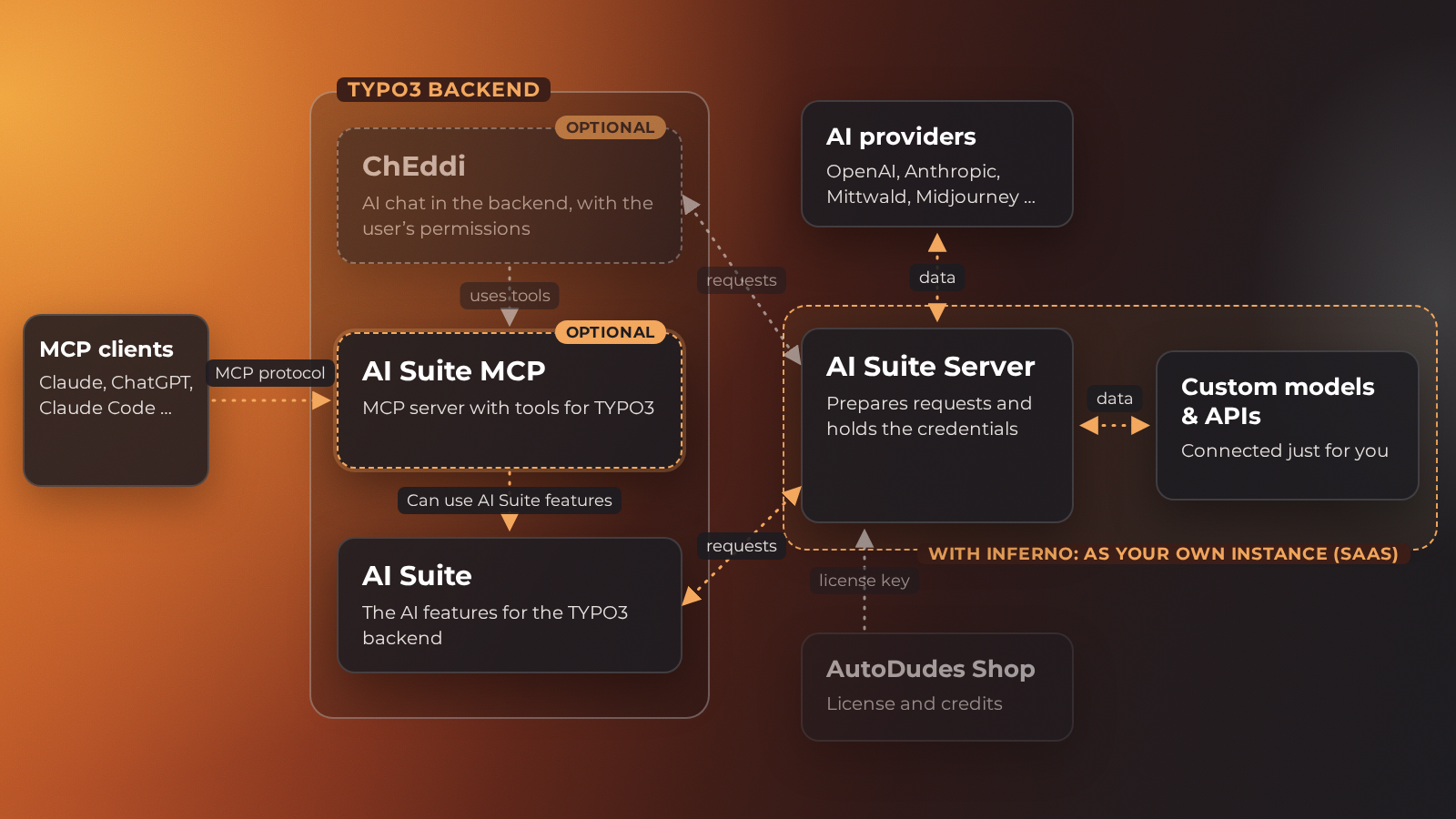
AI Suite MCP provides the tools for TYPO3. MCP clients such as Claude or ChatGPT connect via MCP, ChEddi uses the same tools directly in the backend, except bulk runs, media upload, workspace comparison and server diagnostics. For AI tasks, AI Suite MCP relies on the features of the AI Suite, which sends its requests to the AI Suite server.
 Beta version
AI Suite MCP is under active development and currently in beta (version 0.11.0). Tool signatures, configuration keys and the planned interface for custom tools may still change between minor versions. Production use is possible, but you should pin a fixed version and check the changelog before an update.
What can you do with it?
Once a client is connected, the model can, within the permissions of the linked backend user, among other things:
- traverse the page tree, read pages and search content,
- generate and optimize content (individual content elements, landing pages, entire page trees) and rewrite, shorten or simplify existing texts,
- translate (individual records, entire pages, file metadata, entire folders) into the desired target language,
- fill in metadata at scale (SEO titles, descriptions, OG and Twitter tags, alt texts),
- generate images directly into FAL,
- edit records safely: write actions go through the DataHandler, your client's dialog handles the approval, and in the default write mode every change lands as a reviewable draft in a workspace,
- start batch jobs in the background whose results come back as suggestions for approval,
- and much more.
All actions run as the linked backend user. Page and file mounts, table and field permissions as well as the feature and model permissions of the AI Suite are enforced.
Some of these actions require a valid AI Suite API key because an external AI model is used behind them. If the key is missing or not enough credits are available, the tools remain visible in the tool list and the model also calls them, but the call then ends with a license error. The structural part is not affected. This includes reading and searching, creating, modifying, moving, copying and deleting records, creating translations and embedding existing media. Feature permissions of the backend group work differently: if a permission is missing there, the tool disappears from the list and the model never sees it.
Requirements
The MCP server builds on the AI Suite. The required dependencies, including the AI Suite itself, the system extension reports (Reports) and TYPO3 workspaces, are installed automatically during installation and do not need to be added separately.
- TYPO3 14.3.x/13.4.x/12.4.x (at least 13.4.1 or 12.4.11)
- PHP 8.1 or newer (PHP 8.2 from TYPO3 13)
- AI Suite version 14.6.1/13.18.1/12.24.1 or newer (matching the respective TYPO3 major version)
The AI Suite must be installed and should also be configured so that you can use the full functionality of the MCP server. Installation and setup are administrative tasks. Details can be found under Installation and Configuration.
TYPO3 workspaces are a mandatory dependency, not an option. The default write mode relies on them: it stores changes as a reviewable draft and creates a workspace per user itself when needed.