Security & Operation
The MCP endpoint is reachable from outside and performs actions on behalf of a backend user. It therefore comes with its own protection mechanisms that take effect independently of the TYPO3 permissions. They are enforced in the MCP middleware and in the OAuth endpoints.
- HTTPS is mandatory in production. Exceptions are localhost and *.ddev.site. This can only be overridden with
mcpAllowHttp = 1, which is out of the question in production, because bearer tokens are then transmitted in plain text. - The size of the request body is limited to 1 MB per request by default, adjustable via
mcpMaxRequestBodyMb(for example for Base64 uploads). - Rate limit of 100 requests per minute and token. After that, the server responds with 429 and Retry-After: 60. The OAuth endpoints for authorization, token and registration are additionally limited per client IP and also respond with 429.
- OAuth 2.1 with PKCE. Implicit and password grants do not exist.
- Dynamic client registration is allowed, but restricted by
mcpAllowedClientIdsandmcpAllowedRedirectUris. - A password change revokes all tokens of the affected backend user.
- The status of the backend user is checked afresh with every request. Disabled or deleted users are rejected, even if their token would still be valid.
- Scope and permission are checked twice. An OAuth scope alone is not enough: where a scope or a tool is bound to a feature permission, the backend group must have it as well.
Misconfigurations are reported by the status report under System → Reports → AI Suite MCP Security (TYPO3 14: Administration → Reports), for example allowed HTTP or empty allowlists in the production context.
-
Show larger version
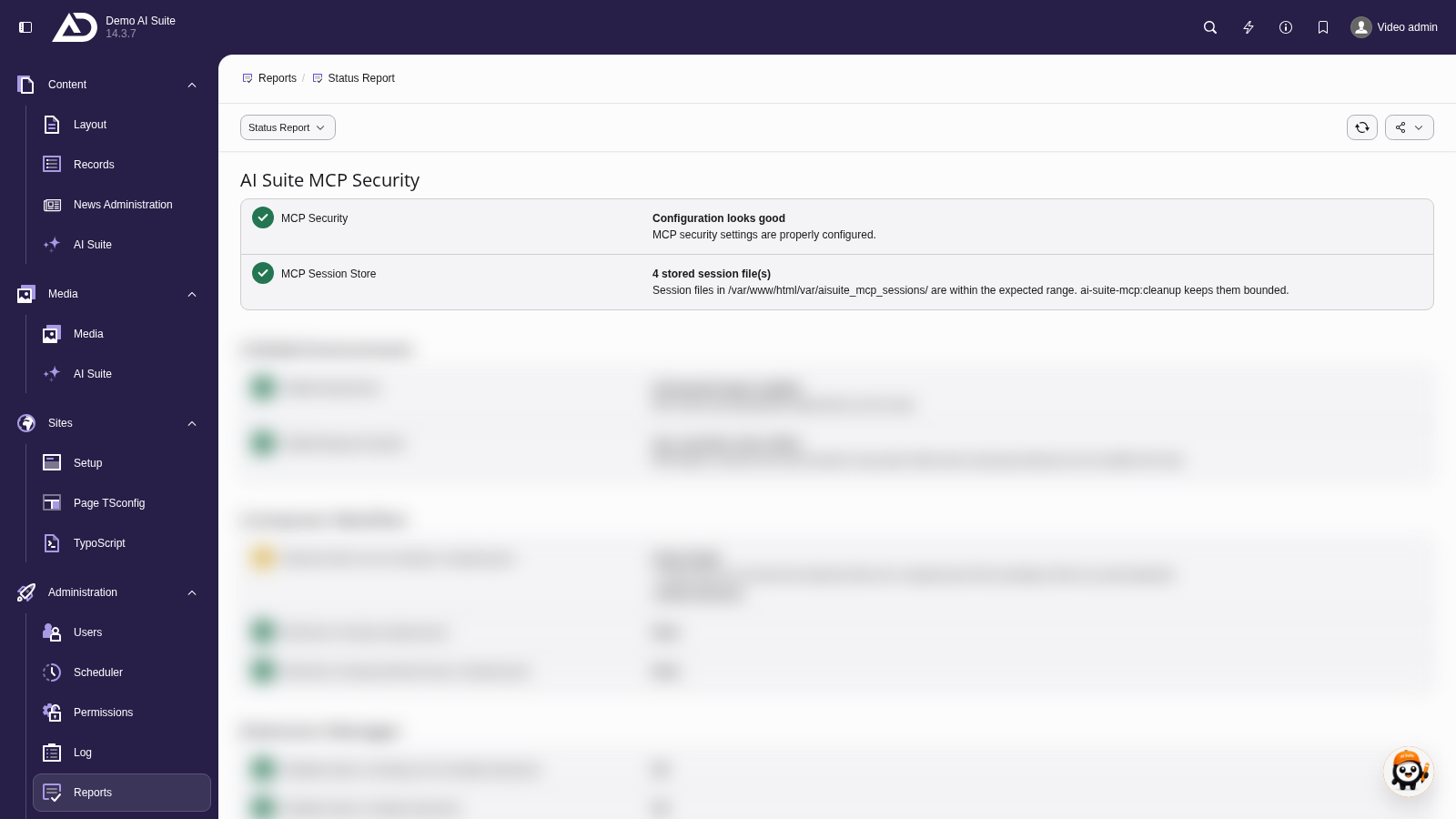
In the status report under System → Reports (TYPO3 14: Administration → Reports), the section “AI Suite MCP Security” checks the security settings and the session store. Green ticks mean that everything is fine.
Security-relevant settings
These options from the extension configuration have a direct effect on security. The remaining settings are described under Configuration.
| Setting | Default | Function |
|---|---|---|
mcpMaxCreditsPerSession | 0 | Credit budget per token, since version 0.8.0. It serves as a safeguard against a runaway or hijacked agent that calls paid tools without restraint. For details see below. |
mcpAllowHttp | 0 | Allows the endpoint via unencrypted HTTP. Only for local development without TLS, never activate in production. |
mcpAllowRawHtmlWrite | 0 | Allows writing tools to put markup unchanged into code editor fields (since version 0.6.0), for example tt_content.bodytext with the CType “html”. TYPO3 outputs these fields unfiltered, so an agent or a prompt injection could place arbitrary HTML and JavaScript there. As long as the option is off, such a write is rejected and the existing value is kept. |
mcpExcludedTables | (empty) | Tables that MCP tools may neither read nor write. Applies in addition to the TYPO3 permissions and also blocks administrators. Since version 0.9.0, the entries extend a shipped block list that already blocks personal data (fe_users, fe_groups, be_users, be_groups), the chat history of ChEddi as well as configuration and system tables. These blocks cannot be lifted. Important: since version 0.9.0, searchContent searches every table with text fields that is reachable through the page tree. A table that is not listed here is therefore searched. An entry makes sense for example for sys_log or custom tables with sensitive data. |
mcpTrustedProxies | (empty) | IPs or CIDR ranges of your own reverse proxies. Only if set, the real client IP is resolved from X-Forwarded-For for the audit log. If the value is empty, the header is ignored. |
mcpLogVerbose | 1 | Switches the detailed INFO log on or off. The warning log remains active in any case. |
mcpLogRedactionPatterns | (empty) | Additional regex patterns whose matches are replaced by [REDACTED] in the log. The built-in patterns always apply. |
mcpMediaAllowUrlFetch | 1 | Allows uploadMedia to download from remote URLs. Switching it off acts as a complete block, Base64 and online media links remain possible. |
mcpMediaHostDenylist | (empty) | Additional host names or IP ranges from which uploadMedia may never load. |
ChEddi inherits mcpWriteMode, mcpAllowRawHtmlWrite, mcpExcludedTables, mcpLogVerbose and mcpLogRedactionPatterns by default and has its own settings for them. For raw HTML and the table block list, ChEddi can only tighten the MCP value, never loosen it. For details see ChEddi: Configuration.
-
Show larger version
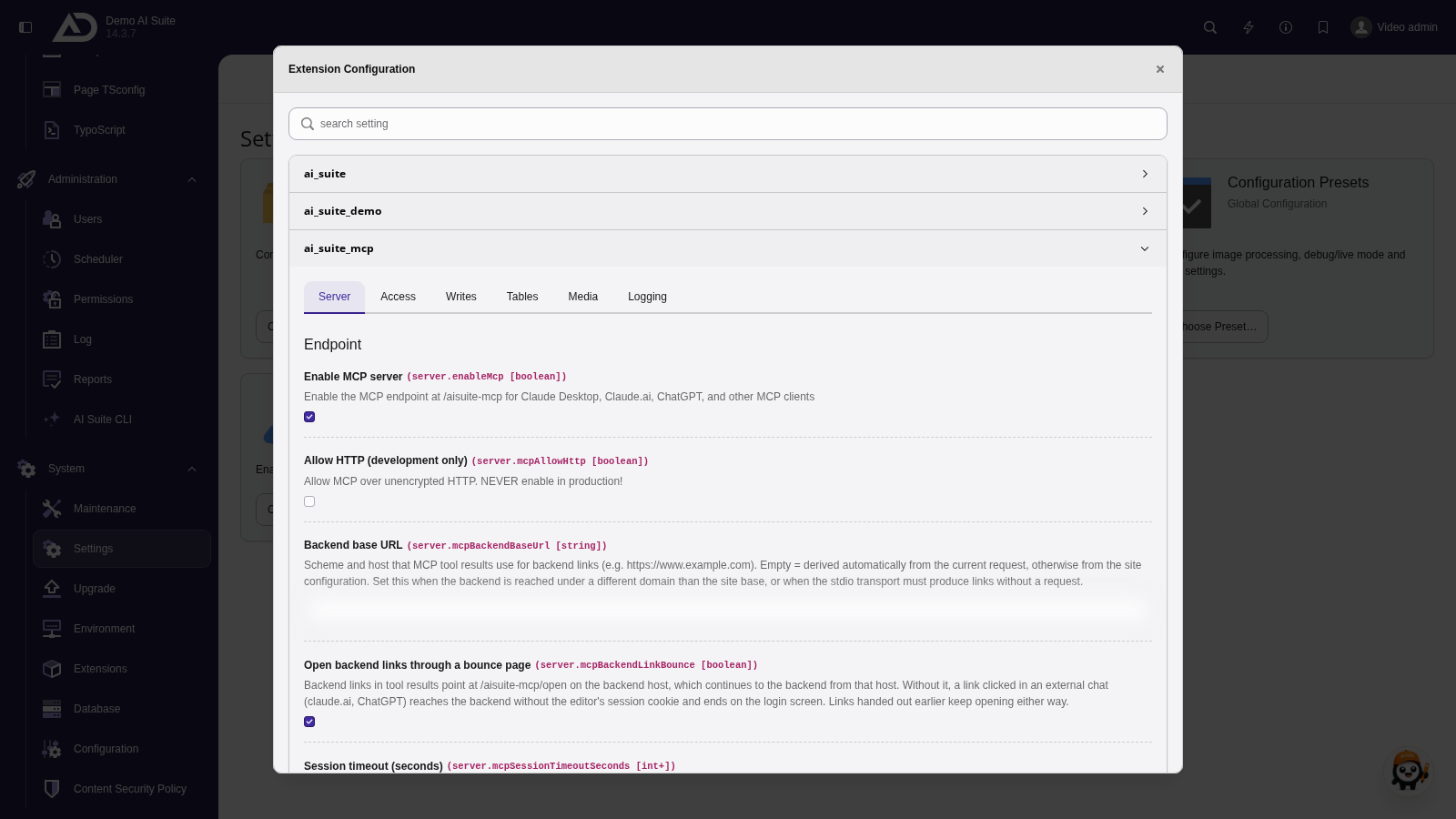
The extension configuration of ai_suite_mcp holds the security-relevant options, such as the main switch for the MCP server and HTTP, which is meant for development only.
Evidence under the EU AI Act
Since version 0.9.0, every write by an MCP tool is recorded in the transparency register of the AI Suite. Everything a tool saves during a call is recorded as AI-generated, with the feature “MCP server” and the client used. If ChEddi writes through the server, the feature “Editor chat” is noted. Read-only calls leave no entry. The records captured this way appear in the “AI content” area of the AI Suite and carry the usual marking in the backend, see AI Content (EU AI Act).
-
Show larger version
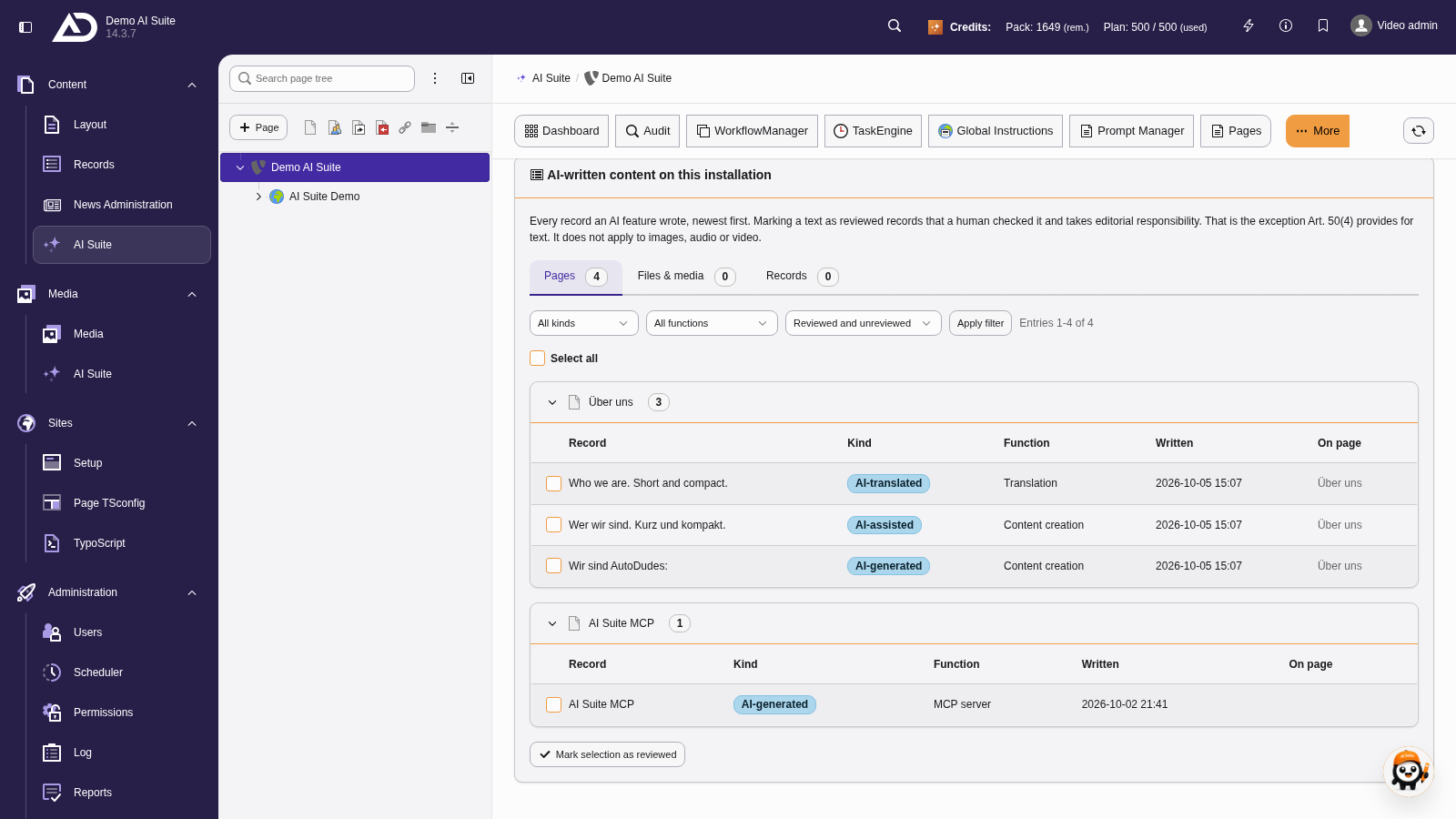
Every write through the MCP server shows up in the AI Suite under “AI content”. The function column names the MCP server, “Mark selection as reviewed” records the editorial review.
Credit budget per token
If mcpMaxCreditsPerSession is set to a value greater than 0, the server keeps track of how many AI credits have been consumed through a token. There are three properties you should know before setting a budget:
- The actual consumption is counted. The basis is the value the AI Suite server reports back for the call, not the cost stated on the tool. The two can differ.
- The check takes effect before every AI call. The call that exceeds the budget is still executed and billed, its result comes back with a notice. Every further AI call with this token is rejected before anything goes to the AI Suite server. The message points out that only a newly issued token starts with a fresh budget.
- The counter is tied to the token, not to the connection. It is stored on the token record and therefore survives a restart of the server and the end of a conversation. A new conversation therefore does not help: with the same token, the counter stays where it is. It is only reset when the client receives a new token. With OAuth clients, this also includes every automatic token renewal (refresh), because the new token starts at zero again. The budget truly applies per access only with a static token.
A budget is therefore suited as an upper limit per token, not as a daily allowance. If you set a budget, choose a rather generous value and keep an eye on the statistics, instead of drawing a tight limit and constantly running into it in everyday use.
Secure media upload
The most sensitive part of the media upload is the download from remote sources. It is secured against SSRF. Only http and https are allowed, every resolved IP must be public. Private, loopback, link-local and reserved addresses are blocked in IPv4 and IPv6, including the cloud metadata endpoint 169.254.169.254. Redirects are checked again step by step, and the download runs as a stream against a hard size limit. Blocked targets end up in the log as a warning.
In addition to the scope mcp:media and the permission enable_mcp_media_upload, the FAL file mount permissions on the target folder apply unchanged. The target folder (mcpMediaDefaultFolder, default 1:/user_upload/), the maximum file size (mcpMediaMaxSizeMb, default 50) and the allowed file extensions (mcpMediaAllowedExtensions) can be controlled via the extension configuration. SVG is deliberately not included, because scripts could be smuggled in with it. Large videos should come via a URL or as an online media link, not as Base64.
Logging and retention
AI Suite MCP writes to two log files of its own.
var/log/aisuite_mcp.logwith everything from INFO upwards, that is the complete trace. Good for troubleshooting and for tracing individual requests. Can be switched off viamcpLogVerbose. In a well-established production environment, the log may stay off, which reduces the write load and the amount of personal data.var/log/aisuite_mcp_warnings.logwith everything from WARNING upwards. Always active, stays small. If the file is not empty, it is worth taking a look, because it contains rate limit hits, failed tool calls and OAuth misconfigurations. This file is the right place for monitoring.
The log records OAuth events (token issued, renewed, revoked) with client ID, backend user UID and client IP, and for every MCP request also the status code, HTTP and JSON-RPC method, tool name and the first 500 characters of the tool arguments as well as the first 500 characters of the response. If the request body is not JSON, its first 300 characters end up in the log instead. In addition, tool errors are logged with a full stack trace. Arguments and responses regularly contain prompts, content excerpts and metadata. This must be taken into account for the retention period and in the data protection documentation. Bearer tokens, 64-character hex hashes and email addresses are automatically masked before writing.
If a problem does not show up in the MCP log, the request either never reached the middleware or was already rejected there because of missing HTTPS (400) or a body that is too large (413), without a log entry. If mcpLogVerbose is off, the INFO trace is missing anyway. Then the access log of the web server helps, see Production Operation.
Database tables
The extension creates two tables of its own. Both belong to the OAuth layer, no content is stored there.
| Table | Content |
|---|---|
tx_aisuite_oauth_codes | Short-lived authorization codes with PKCE challenge and redirect URI |
tx_aisuite_oauth_tokens | Access and refresh tokens, client metadata, last used IP, credit consumption |
The tables are not cleaned up on their own. This is done by the command ai-suite-mcp:cleanup, see CLI Commands.
 Don't forget maintenance
In production, ai-suite-mcp:cleanup is not an option but a requirement and should run at least hourly. Without the command, the authorization codes table grows indefinitely, session and task directories fill up, and revoked or expired tokens remain in tx_aisuite_oauth_tokens. For setup via scheduler or cron, see CLI Commands.