Production Operation
Once configuration, security settings and clients are set up, the MCP server runs. For stable production operation, you additionally need the points on this page. None of them is enforced by the code. If one is overlooked, this usually does not show as a loud error but as a silent failure. Session data gets lost, expired tokens pile up, gaps appear in the audit log.
Applying updates
Clear all caches after every update of AI Suite MCP, otherwise old tool definitions remain in place.
When moving to version 0.6.0, there are three points that become noticeable in production. First, the write mode workspace no longer falls back to live if no draft workspace can be provided, but refuses the call. So check before the update whether your backend users can get a workspace, and otherwise switch to “Live”. Second, markup only ends up in code editor fields if the new setting mcpAllowRawHtmlWrite is active, otherwise the extension rejects the write instead of silently flattening the content, see Security & Operation. Third, reading tools in the draft workspace now resolve the workspace overlay, so previews show the draft state and no longer the live data.
Version 0.7.0 removes the write mode auto. If it is still in your configuration, AI Suite MCP writes into a draft workspace from the update onwards. If you want to keep writing directly to live, explicitly set the mode to “Live”. In addition, the tool results now carry backend links. If your backend runs under a different domain than the site, enter scheme and host of the backend under mcpBackendBaseUrl (for example backend.example.com), otherwise the links are missing or point to the wrong domain.
Version 0.9.0 merged tools and removed settings, see Available Tools.
Reverse proxy and load balancer
HTTPS detection. The MCP middleware accepts not only the request schema but also the header X-Forwarded-Proto: https. If your CDN or load balancer terminates TLS and forwards unencrypted to the origin, the proxy must set this header.
Trust boundary of the HTTPS check. This header is accepted by every counterpart; the HTTPS check does not consider mcpTrustedProxies. This setting only regulates the IP resolution in the audit log. A client that accesses the origin directly and sends X-Forwarded-Proto: https itself bypasses the check. Ensure that your proxy removes the header from incoming traffic before setting it itself, or allow access to the origin only from proxy IPs, via firewall or VPC.
Client IP in the audit log. OAuth events log the resolved client IP. By default, this is the IP of the direct counterpart, so behind a proxy, it is that of the proxy and not the user’s. If you enter your proxy IPs or CIDR ranges in mcpTrustedProxies, the chain in X-Forwarded-For is traversed from the right, trusted intermediaries are skipped, and the first untrusted address is logged. If the setting is left empty, the header is completely ignored. This way, no one can write a false IP into the audit log through a self-set header.
Setting up the web server
Apache with mod_php or FCGI. The MCP endpoint needs the Authorization header, and without the matching rewrite rule Apache discards it before PHP sees it. The token endpoints then keep working because they evaluate the body, but the MCP endpoint permanently responds with 401. Check whether your .htaccess contains these two lines:
RewriteCond %{HTTP:Authorization} ^(.*)
RewriteRule .* - [E=HTTP_AUTHORIZATION:%1]
Nginx with php-fpm. Here, the equivalent belongs in the PHP location block.
location ~ \.php$ {
    fastcgi_param HTTP_AUTHORIZATION $http_authorization;
    # ... existing include of the fastcgi_params
}
Also set client_max_body_size to at least the limit from mcpMaxRequestBodyMb (default 1 MB) plus a reserve for batch requests. 8m is a safe value. PHP post_max_size must allow the same size.
Operation behind HTTP Basic Auth
Staging environments, internal instances and pages not yet published are often behind HTTP Basic Auth. This collides with the MCP server, because both use the same header. Basic Auth sends Authorization: Basic ..., the MCP endpoint expects Authorization: Bearer .... A request can carry only one of these headers. A connector behind Basic Auth therefore fails with 401 before PHP even runs. The MCP log then shows nothing, because the request never reaches the middleware.
Operation behind Basic Auth is possible, but the MCP paths have to be excluded. Their protection is then taken over by the server's own OAuth and bearer token check. The following must be reachable without Basic Auth:
/.well-known/oauth-authorization-serverand/.well-known/oauth-protected-resourcefor the OAuth discovery. The client calls these paths first./.well-known/openid-configuration, the fallback path with the same document. Some clients query it first./aisuite-mcp/oauth/*for the OAuth flow. The login under/aisuite-mcp/oauth/authorizeis the TYPO3 backend login itself and must not be hidden by Basic Auth./aisuite-mcpincluding subpaths, that is the endpoint itself. Every token is bound to a specific backend user with enforced permissions.
Exclude MCP paths
1. Check THE_REQUEST, not Request_URI. In TYPO3, the front controller rewrites the request to index.php before the authorization phase runs. A condition on Request_URI therefore no longer sees the original path and silently does not take effect. %{THE_REQUEST} is the unchanged request line and survives internal rewrites.
In the .htaccess in the web root, extend your existing Basic Auth configuration with a RequireAny block, replacing the previous line Require valid-user.
AuthType Basic
AuthName "Restricted"
AuthUserFile /path/to/.htpasswd

<RequireAny>
    Require expr %{THE_REQUEST} =~ m#\s/\.well-known/(oauth-|openid-configuration)#
    Require expr %{THE_REQUEST} =~ m#\s/aisuite-mcp#
    Require valid-user
</RequireAny>
A request to an MCP path matches one of the Require expr lines and gets through without Basic Auth, everything else falls back to Require valid-user. Do not use <Location> or <LocationMatch> for this. These directives are only allowed in the server or vHost configuration and lead to a 500 in a .htaccess.
Nginx. Under Nginx, you switch off Basic Auth for the MCP paths via a map:
map $request_uri $auth_realm {
    default                              "Restricted Area";
    ~^/aisuite-mcp                       "off";
    ~^/\.well-known/oauth-               "off";
    ~^/\.well-known/openid-configuration "off";
}

server {
    # ...
    auth_basic           $auth_realm;
    auth_basic_user_file /etc/nginx/.htpasswd;
}
Use prefix regexes, not exact paths, because the login under /aisuite-mcp/oauth/authorize always comes with a query string.
2. Check. The rest of the site stays behind Basic Auth, only the MCP interface is open and protected there by OAuth. All three calls must return 200 and JSON.
curl -i <host>/.well-known/oauth-protected-resource
curl -i <host>/.well-known/oauth-authorization-server
curl -i <host>/aisuite-mcp/health
Also check curl -i "https://<host>/aisuite-mcp/oauth/authorize?response_type=code&client_id=x&state=aaaaaaaaaaaaaaaaaaaaaa". The response itself does not matter, it just must not contain WWW-Authenticate: Basic.
A 403 means that a block via an environment variable or a host-side block of dot paths is still in effect. If the host blocks via an environment variable, for example Deny from env=SECURED, lift it for the MCP paths directly afterwards:
SetEnvIf Host staging\.example\.com$ SECURED=yes
SetEnvIfExpr "%{THE_REQUEST} =~ m#\s/(\.well-known/(oauth-|openid-configuration)|aisuite-mcp)#" !SECURED
SetEnvIfExpr is necessary because SetEnvIf cannot check THE_REQUEST. A 401 with WWW-Authenticate: Basic means that the exception from step 1 does not take effect. Then check whether it really checks THE_REQUEST, and under Nginx whether the map uses prefix regexes. If the rewrite rule for the Authorization header is missing, the endpoint responds with 401 even though discovery and OAuth flow work.
Runtime and scaling
PHP runtime. The extension is designed for the classic flow of PHP-FPM or mod_php, that is one process per request. An in-process cache for readable page IDs assumes that the process ends with the request. The MCP server therefore must not run on runtimes with persistent workers such as FrankenPHP or RoadRunner, otherwise read permissions can leak between backend users.
Multiple nodes and load balancing. The transport sessions under var/aisuite_mcp_sessions/ and the results of the background tasks under var/mcp_tasks/ are stored in the local file system. With several application nodes, you therefore need either sticky sessions, so that a client always lands on the same node, or a shared file system for these two directories. The OAuth state itself is stored in the database and is shared automatically.
Keep an eye on the session directory. A stateless MCP client that uses an older protocol version leaves one file behind per request, so on a heavily used instance the number grows quickly. With protocol version 2026-07-28, no session files are created. Since version 0.7.0, the status report (System → Reports, TYPO3 14: Administration → Reports) shows the number in the entry “MCP Session Store” and switches to a warning above 500 files. readServerInfo reports the same number to admins and writes a warning to the log from this threshold on. Cleanup is done with ai-suite-mcp:cleanup, which removes the files older than twice mcpSessionTimeoutSeconds, but at least one hour. Set up the command in the scheduler or via cron.
-
Show larger version
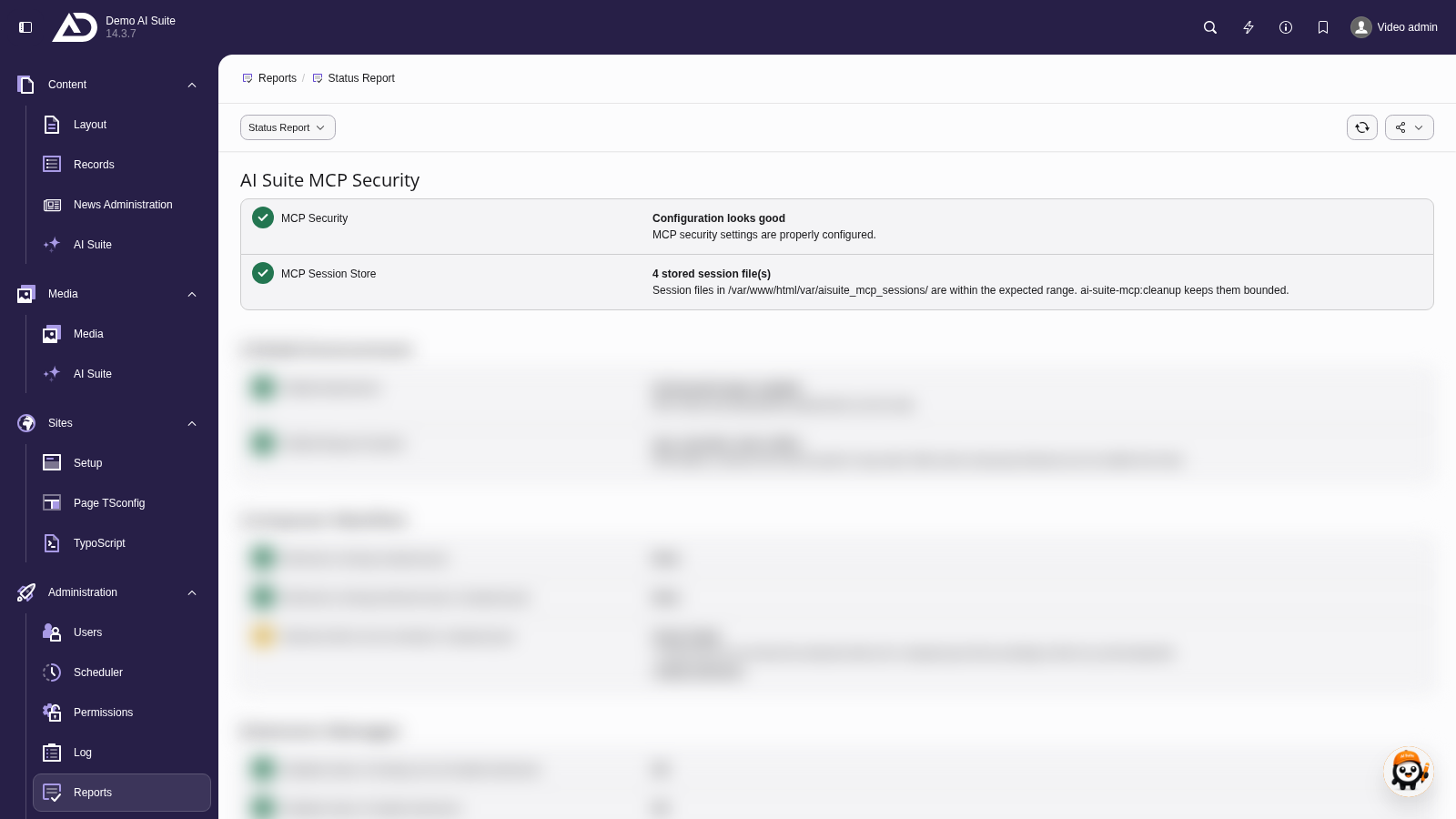
In the status report, “MCP Session Store” shows how many session files are stored and whether their number is within the expected range. The ai-suite-mcp:cleanup command keeps it small.
Outgoing connections
The MCP tools that call external AI providers use the network configuration of the AI Suite. The server needs outgoing HTTPS connections to the configured AI Suite server.
In isolated environments with a strict firewall, allow exactly the host that is actually configured in your AI Suite settings. Besides the AI Suite server, the server establishes connections itself in three cases: uploadMedia loads files from remote URLs (can be switched off with mcpMediaAllowUrlFetch, can be restricted via mcpMediaHostDenylist). readRenderedPage and batchGenerateMetadata fetch the site's own frontend, so the server must be able to reach its public address itself. auditContent loads the checked page, with url also from other domains.
For ongoing maintenance see CLI Commands, for logging and retention Security & Operation.