ChEddi
ChEddi is an AI assistant that lives inside the TYPO3 backend. On every backend page, a floating button opens a chat area. There you describe in plain language what you need, for example “translate this page into English” or “which pages have no image?”.
ChEddi works with the permissions of the logged-in user. All changes it makes land in a draft workspace by default, so they stay invisible to visitors until you publish them.
-
Show larger version
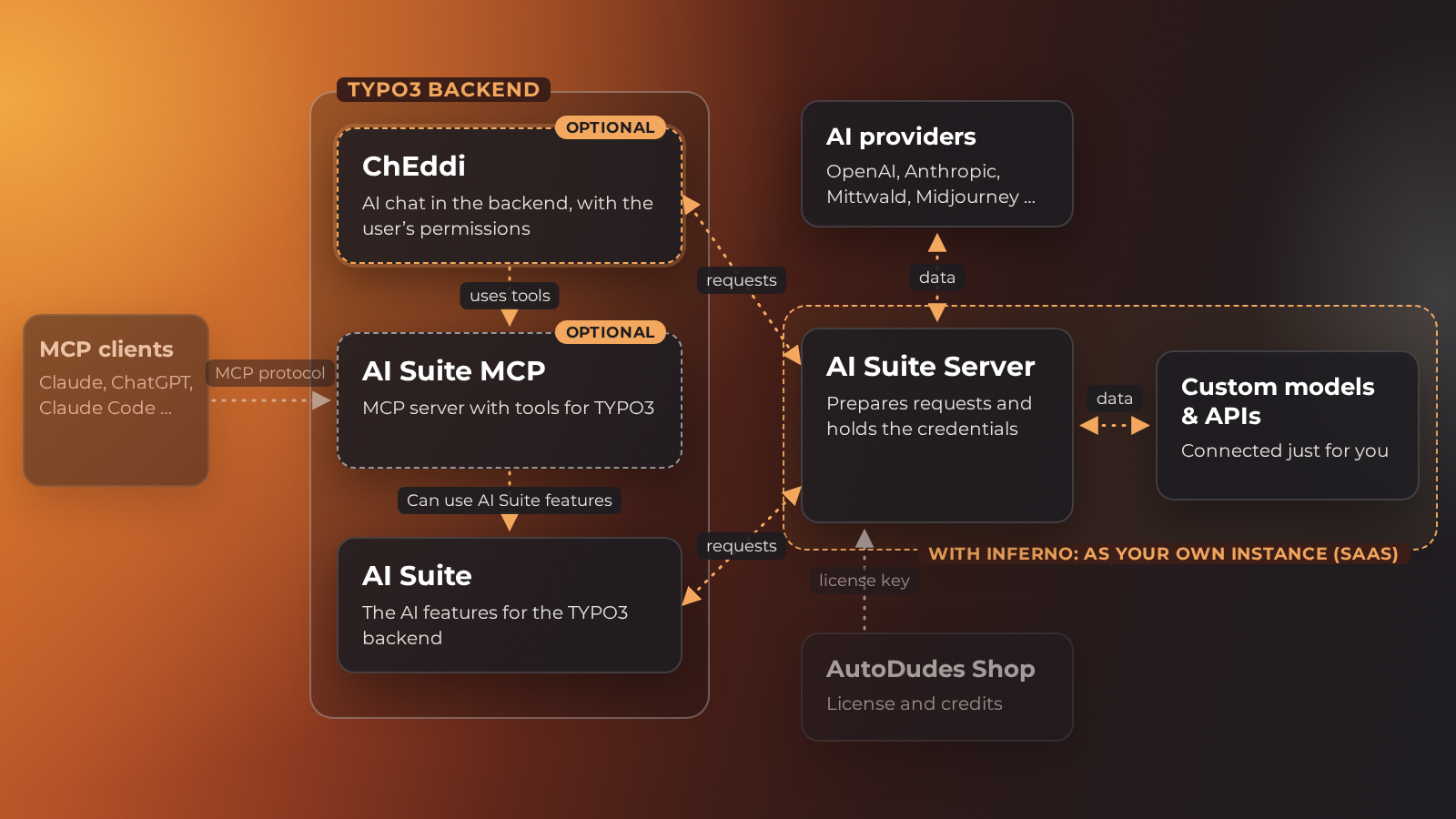
ChEddi uses the tools of AI Suite MCP and, through them, the features of AI Suite. ChEddi sends its chat requests directly to the AI Suite server, which holds the credentials and passes the requests on to the AI providers.
 Beta version
ChEddi is in active development and currently at beta stage (version 0.4.0). The feature set and the internal interface are settling down, but smaller changes between minor versions are still possible. Pin a fixed version and check the changelog before an update.
Connection to AI Suite and MCP
ChEddi is a separate extension, but it does not run on its own: it builds on two others. Composer installs both along with it:
- AI Suite provides the infrastructure, the permission model for backend groups, the TYPO3 compatibility layer and the shared services. See AI Suite.
- AI Suite MCP provides the tool registry. ChEddi drives the same tools an external MCP client uses, just from inside the backend instead of from outside. See TYPO3 MCP + AI Suite.
An important point for understanding it: the chat never talks to an AI provider directly. Every turn goes to the AI Suite server, which holds the credentials and runs the model.
MCP straight in the backend
Driving TYPO3 through the MCP server and using the AI Suite features while doing so has been possible for a while. Until now it took an external client though: Claude Desktop, Claude Code or another tool that connects to your TYPO3 instance. That means setting up a client, creating a token, and switching between two programs all day.
ChEddi brings exactly that functionality into the backend. Same tools, same permission checks and same write paths as with the MCP server, only without the detour through a second program. No client, no token, no window switching. You stay in TYPO3 and have the chat right where you are working anyway.
Typical tasks
- find and read pages, content elements and files and have them explained
- create and change content, page trees and metadata
- translate pages and content into the languages of your website
- create content from an attached document, for example from a PDF
- search the existing content and answer questions about it, for example which pages do not have a meta description yet
- look things up on the web when needed and supply the sources used right away, provided your backend group may use Web research
Because ChEddi uses the tools of the MCP server, it can essentially do everything an external AI client can do on your instance. You can find the list of tools under Available Tools.