Extension Configuration / Backend User Group
In the following section, you will find all available configuration options of the AI Suite. The configuration key and the data type are given in brackets. Since versions 13.0.0/12.6.0/11.3.0, individual extension configurations can be overridden by user group-specific configurations. This only applies to the API keys (aiSuiteApiKey, openAiApiKey, anthropicApiKey, aiModelHubApiKey, mittwaldAiModelHubApiKey, googleTranslateApiKey, deeplApiKey, midjourneyApiKey), the free version of the DeepL API (deeplApiMode), the Midjourney ID (midjourneyId) and the storage folder for image and media files (mediaStorageFolder). All other settings apply to the entire installation.
All settings at a glance
License & server
License data for the server, the data protection switch for GDPR-compliant models and, if your site is protected by an access restriction, the HTTP basic authentication. The latter is available since versions 13.1.0/12.7.0. Without it the AI Suite cannot fetch a protected page, which affects metadata generation among other things.
- AI Suite license Key (aiSuiteApiKey, string)
-
Your license key generated at www.autodudes.de. Without it none of the AI functions work.
- AI Suite server (aiSuiteServer, string)
-
Address of the AutoDudes server. As a rule, leave it unchanged.
Default:
https://api.autodudes.de/ - System domain (aiSuiteSystemDomain, string)
-
Since versions 14.5.0/13.17.0/12.23.0. The domain this installation is licensed for. It is needed for CLI and cron runs, where no HTTP host is available. If the field stays empty, the domain is derived from the backend host or the site configuration.
Default:
empty - Only load GDPR-compliant libraries (forceGdpa, boolean)
-
Restricts the choice to those AI models marked as GDPR-compliant on the AI Suite server. Models without that marking then disappear from every selection.
Default:
off - Enable Basic Authentication (basicAuth.enable, boolean)
-
Enables authentication with username and password for every request the AI Suite makes to your site.
Default:
off - Username (basicAuth.user, string)
-
The username of the access restriction, not that of a TYPO3 backend user.
- Password (basicAuth.pass, string)
-
The matching password. It is stored in plain text in the extension configuration, so it applies to the access restriction only and should not be reused anywhere else.
Audits
The settings of the audit area in the backend module “AI Suite”. They are available since versions 14.5.0/13.17.0/12.23.0, have their own tab since versions 14.6.2/13.18.2/12.24.2 and are described in detail under AI Audit.
- WCAG conformance level for accessibility audits (auditWcagStandard, options)
-
WCAG 2 Level A, AA and AAA are available. The value controls the HTML_CodeSniffer run. The axe run used in addition checks against its own rule set and is independent of it.
Default:
WCAG2AA - Default AI model for audit analyses (auditDefaultTextModel, string)
-
A model identifier, for example
Anthropic. If a model is set here, the model selection in the audit form is skipped. If the field stays empty, editors choose per run themselves.Default:
empty
Translation
Covers the general translation settings as well as automatic translation on save. The latter is available since versions 14.3.0/13.15.0/12.21.0 and described in detail under Automatic Translation on Save.
- Use the following library for "Einfache Sprache" translations (easyLanguageLibrary, options)
-
Available are OpenAI, Claude and Meta Llama-3.3 (70B-Instruct). Added with the plugin for “Easy Language” in versions 13.3.0/12.9.0.
Default:
ChatGPT - Disable whole translation functionality (disableTranslationFunctionality, boolean)
-
Switches off the entire translation function. Use with care, because automatic translation stops working as well.
Default:
off - Translate FlexForm fields (translateFlexFormFields, boolean)
-
When FlexForm translations were introduced in versions 13.2.0/12.8.0, the option to switch this function on and off was added with them.
Default:
on - Update DeepL glossaries (updateDeeplGlossaries, boolean)
-
Removed in versions 14.6.0/13.18.0/12.24.0, as it was no longer used.
It kept the glossaries stored at DeepL in sync with your glossary entries in TYPO3, see Glossary function. Synchronization now happens via the “Synchronize DeepL glossaries” button.
Default:
n/a - Automatically translate content elements into all site languages on save (enableAutoTranslateOnSave, boolean)
-
Switches automatic translation on. Without it the following three settings have no effect.
Default:
off - Processing mode for automatic translation (autoTranslateMode, options)
-
Three choices: “Page module” applies finished translations when the page module is opened and shows the status in the page tree. “CLI scheduler” requires
ai-suite:process-tasksto be running. “Directly on save” translates synchronously, which blocks the save and only suits a small number of languages.Default:
pageModule - Model used for automatic translation on save (autoTranslateModel, options)
-
Available are OpenAI, DeepL, Google Translate, Claude and Mittwald AI.
Default:
ChatGPT - Safety cap: maximum number of content elements a single save may auto-translate (autoTranslateMaxElementsPerSave, int+)
-
If a save changes more elements than allowed here, for instance during a bulk edit, automatic translation is skipped for that save and the editor is notified. A value of 0 lifts the limit.
Default:
15 - Open the translated record in edit mode (openTranslatedRecordInEditMode, boolean)
-
Removed in versions 13.11.2/12.17.2.
It controlled whether a translated record opens directly in the editing mask or whether you stay in the overview of the “Records” module (in TYPO3 12: “List”).
Default:
n/a - Translate "Plain HTML" content elements: the translated markup is written unfiltered and rendered in the frontend as it is (translatePlainHtml, boolean)
-
Added in versions 14.7.0/13.19.0/12.25.0. Since then, the AI Suite no longer translates the markup of “Plain HTML” content elements, because the frontend outputs it unfiltered. Enable the option to translate these elements as before.
Default:
off
Metadata
Covers metadata generation in the wizard as well as automatic generation, which takes effect as soon as a file is uploaded to the file list.
- Amount of metadata suggestions to be displayed (metadataSuggestionCount, options)
-
How many suggestions per field the metadata wizard offers, selectable from 1 to 5.
Default:
5 - Minimum number of characters of fetched page content (minPlausiblePageContentLength, int+)
-
Lower bound of characters a fetched page must have before its content is sent to the AI for metadata generation. Protects against metadata being invented from a nearly empty page.
Default:
100 - Generate image titles automatically on file upload (metadataAutogenerateTitle, boolean)
-
Default:
off - Generate alternative text automatically on file upload (metadataAutogenerateAlternative, boolean)
-
Default:
off - Use the following library for autogenerated metadata generation on file upload (metadataAutogenerateModel, options)
-
Default:
Vision - How to handle autogenerated file metadata? (metadataAutogenerateApproach, options)
-
Either the suggestions land in the TaskEngine and are reviewed there, or the first suggestion is saved directly.
Default:
taskEngine - Own prompt for autogenerated file metadata on upload (metadataAutogeneratePrompt, string)
-
Since versions 14.4.0/13.16.0/12.22.0. Replaces the predefined instruction. If you leave the field empty, the standard instruction stays active.
Default:
empty - Detail plugin for displaying records from EXT:news (singleNewsDisplayPage, int+)
-
Replaced with dynamic queries during the generation process in versions 13.0.0/12.6.0/11.3.0.
Default:
n/a - Always use URL for metadata requests (useUrlForRequest, boolean)
-
Removed in versions 13.0.0/12.6.0/11.3.0.
Default:
n/a
Media
The storage location of images and media generated with the AI Suite. A separate tab since versions 14.6.2/13.18.2/12.24.2.
- Store image and media files at this folder (mediaStorageFolder, string)
-
Relative path to the folder where images and media generated with the AI Suite are stored, for example
ai-images/subfolder. A combined identifier such as1:/user_upload/ai-imagesworks too. If the folder does not exist, it is created.Default:
empty
CLI
The background tasks of the CLI commands. A separate tab since versions 14.6.2/13.18.2/12.24.2.
- Maximum number of CLI background tasks processed per scheduler run (maxTasks, int+)
-
Limits how many background tasks one run of
ai-suite:process-tasksworks through. The limit also applies toai-suite:retry-tasks. See CLI commands.Default:
50
EU AI Act
The marking of AI-written content. The category is available since versions 14.6.0/13.18.0/12.24.0 and described in detail under AI Content (EU AI Act).
- Record which records were written by an AI feature (provenanceTracking, boolean)
-
Keeps the register that serves as evidence under Art. 50(2) of the EU AI Act and forms the basis for the marking in the backend. When switched off, nothing is recorded anymore and nothing is marked anywhere.
Default:
on - Disclose AI translations as AI-generated as well (provenanceDiscloseTranslations, boolean)
-
AI translations are recorded in any case. The option determines whether they are also disclosed as AI-generated. A faithful translation preserves the meaning of the source text and can therefore be considered exempt.
Default:
off - Show the AI marking in the backend (provenanceShowLabels, boolean)
-
Shows the badge in the page module and the notices on the fields filled by AI. When switched off, the register and the machine-readable image marking remain in place, only the visible marking for editors is dropped.
Default:
on
Own API keys
This tab matters for everyone using “Bring your own keys”. The keys stored here are used together with your license key. Grouped into text models, translation services and image models.
- Enter your OpenAI API key (openAiApiKey, string)
- Enter your Anthropic API key (anthropicApiKey, string)
- Enter your AI Model Hub API key (aiModelHubApiKey, string)
-
IONOS, also used for Flux.
- Enter your Mittwald AI Model Hub API key (mittwaldAiModelHubApiKey, string)
-
For the Mittwald models. Available since versions 14.6.0/13.18.0/12.24.0.
- Enter your Staan API key (staanApiKey, string)
-
Only needed with “Bring your own keys”, and there only for web research in GDPR mode.
- Enter your GoogleTranslate API key (googleTranslateApiKey, string)
- Enter your DeepL API key (deeplApiKey, string)
- Free version of DeepL API (deeplApiMode, boolean)
-
Switch this on if you use the free DeepL API. The two variants address different endpoints.
Default:
off - Enter your Midjourney API key (midjourneyApiKey, string)
-
Midjourney cannot currently be used with “Bring your own keys” (see Packages/Licenses). The fields already exist so that a later activation works without an update.
- Enter your Midjourney ID (midjourneyId, string)
Since versions 14.5.0/13.17.0/12.23.0 the extension settings are grouped into categories and subcategories. The settings themselves stayed the same. Since versions 14.6.2/13.18.2/12.24.2 they are split into eight tabs: “License & server”, “Audits”, “Translation”, “Metadata”, “Media”, “CLI”, “EU AI Act” and “Own API keys”.
-
Show larger version
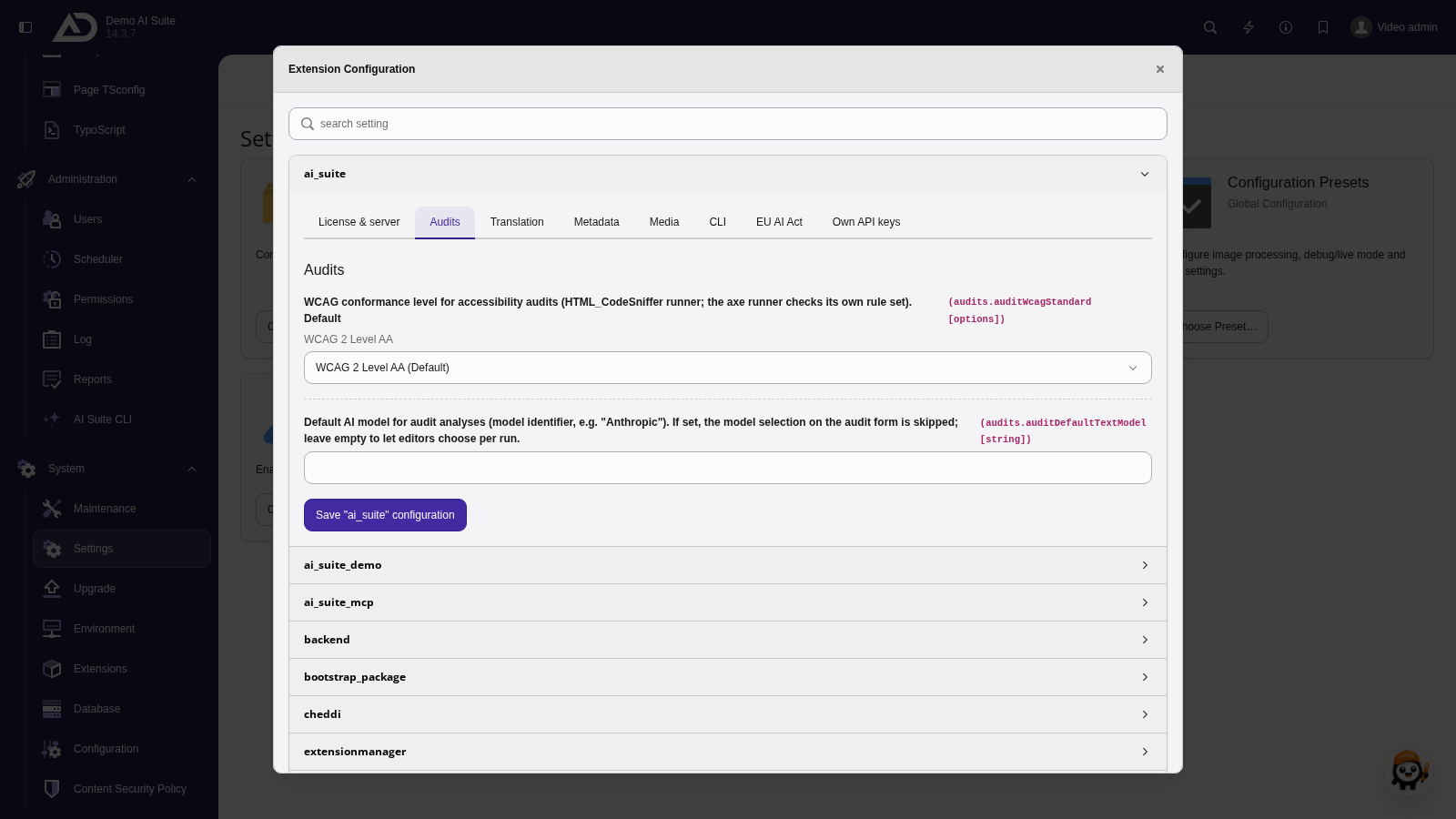
The extension configuration is split into tabs: “License & server”, “Audits”, “Translation”, “Metadata”, “Media”, “CLI”, “EU AI Act” and “Own API keys”. Keys and addresses are made unreadable.
-
Show larger version
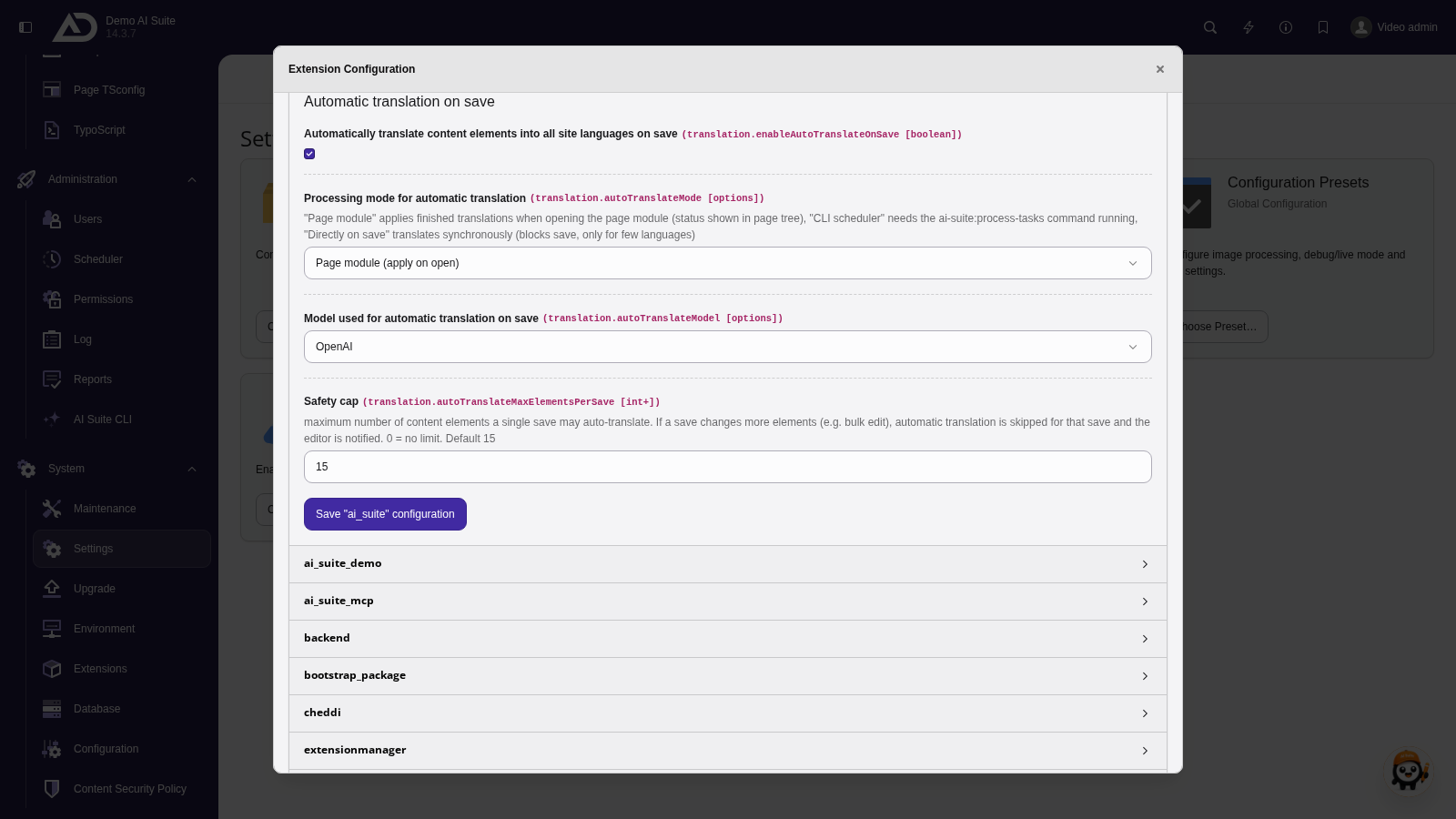
In the “Translation” tab, we use the “Automatic translation on save” section to define whether, how and with which model content is translated on save.
Language Assignment (Locale Mapping)
In some TYPO3 installations, the language codes stored in the site configuration do not match the language codes that are ultimately to be transmitted to the connected AI services (e.g., DeepL, Google Translate, or ChatGPT).
Since versions 13.11.2/12.17.2, you can use the optional configuration aiSuite.locales in the config.yaml of your site to define a mapping from the TYPO3 language code to the desired target locale.
Add the following block to your site configuration (config/sites/<identifier>/config.yaml):
aiSuite:
locales:
en: en-GB
…
On the left is the TYPO3 language code (ISO 639-1, e.g., en, de, fr), on the right the locale that is to be transmitted to the AI services.